
One Login Form, Eight Test Cases: A Worked Example
The post announcing the
/createEquivalenceClassTable skill explains how it works: the six workflow steps,
the CASCADE markers, what lands in the Excel file. What it does not contain is one complete, small
example with real output. This is that example. Everything below — the table, every generated
value, the error we hit — came out of an actual run, not out of an illustration. If you want
the mechanics of the skill itself, read that post first; here we only use it.
The subject is a login form, on purpose. Everybody understands one, nothing needs explaining, and most teams already have tests for theirs — which makes it the best object for a comparison at the end.
Ask for a Table
One line is the starting gun:
/createEquivalenceClassTable Login FormThat is all the prompting there is. The table shown next was built to the skill’s rules and run through Nanook; the prompt is the entry point, and the rest of this post is about what comes out of it.
What Comes Back
An equivalence class table — Nanook calls it a decision table — with eight columns, one per test case. Here it is with the bookkeeping rows
(Execute, Multiplicity) removed, and the class counts and the coverage sum
added — the skill’s Excel formulas produce the same rows. The generator column says where run-time
values come from — gen: calls a registered generator, a bare value is used
as-is; more on it in “When Faker Is Not Enough” below. Eight cases side by side are
meant to be read across, not down: one column is one test case (scroll the table sideways if
your screen is narrow).
| generator | rule | OK_login | E_emailEmpty | E_emailNoAt | E_emailTooLong | E_passwordEmpty | E_passwordTooShort | E_unknownUser | E_lockedUser | ||
|---|---|---|---|---|---|---|---|---|---|---|---|
| Secondary data — what must already exist | |||||||||||
| account | 3 classes | 1 | 1 | 1 | 1 | 1 | 1 | 1 | 1 | ||
| exists, active | active | the normal world | x | x | x | x | x | x | |||
| does not exist | absent | nobody registered that | x | ||||||||
| locked | locked | too many failed attempts | x | ||||||||
| Primary data — the login form | |||||||||||
| 4 classes | 1 | 1 | 1 | 1 | 1 | 1 | 4 | 4 | |||
| valid | gen:1:faker:internet.email | x | x | x | a | a | |||||
| empty | min(1) | x | e | e | |||||||
| no @ | torsten.link | format | x | e | e | ||||||
| too long | gen::len:255 | max(254) RFC 5321 | x | e | e | ||||||
| password | 3 classes | 1 | 3 | 3 | 3 | 1 | 1 | 3 | 3 | ||
| valid | gen:1:faker:internet.password | x | a | a | a | a | a | ||||
| empty | min(1) | e | e | e | x | e | e | ||||
| too short | ab | min(8) | e | e | e | x | e | e | |||
| Summary — combinations covered | |||||||||||
| product of the counts above | 3 × 4 × 3 = 36 in total | 1 | 3 | 3 | 3 | 1 | 1 | 12 | 12 | ||
| 1 + 3 + 3 + 3 + 1 + 1 + 12 + 12 = 36 of 36 — 100 % coverage | |||||||||||
| Expected reaction | |||||||||||
| signed in | session cookie is set | x | |||||||||
| rejected | with a message | x | x | x | x | x | x | x | |||
| Expected effect | |||||||||||
| failed-attempt counter rises | real account, wrong password | x | |||||||||
| failed-attempt counter unchanged | success or unknown user | x | x | ||||||||
Four things to look at, in this order.
- Two sections, not one. Secondary data describes the world the test lands in; Primary data is what the form receives. Whether the account is locked is not something you type into a login form — it has to be true before the test starts. Keeping the two apart is what lets the table say “valid credentials, locked account” as one case instead of a paragraph of setup code.
- Equivalence classes, not values.
emailhas four: valid, empty, no@, too long. Each stands for infinitely many concrete inputs.passwordhas three,accounthas three. The table never lists a specific email address as a row; it lists the reasons an address can be accepted or rejected. - The arithmetic. The small number next to each field counts the classes a case
claims there; the Summary row multiplies them per column.
E_unknownUserclaims 1 × 4 × 3 = 12 combinations — the account is the one thing wrong, so every email class and every password class is admissible. The eight products sum to 36, which is exactly the 3 × 4 × 3 the three fields span: 100 % of the combination space, claimed by eight columns. - The markers.
xselects exactly this class for the case.amarks the preferred class where several are admissible — that is the one Nanook generates.emarks the other admissible classes: they count towards coverage but are not generated unless noaorxis present. Togetheraandeare the CASCADE pattern from the earlier post, and the reason eight columns cover every class exactly once.
The last two rows are the ones people miss. Note what is not there: no row says
“the counter must not rise”. A blank cell asserts nothing — a table states its expectations positively, one row per statement,
each selected with an x. So the counter gets two rows — rises and
unchanged — and the cases take sides: a real account with a wrong password demands
the first, a successful login and an unknown user demand the second. Five columns say nothing about
the counter; three take a position, and the two positions contradict each other. That contradiction
is the assertion: a probe that always reports a rising counter fails two cases, one that never
reports it fails the third.
Read one column and the method explains itself
Take E_passwordTooShort and read it top to bottom: account active,
email valid, password too short. Exactly one thing is wrong;
everything else is right.
That is the whole discipline of error-case design, and in a table you can see it at a glance instead of reasoning about it. The counter-example is one everybody has written at some point: a test that submits an empty email and a two-character password. It passes when the form rejects either one — and therefore proves nothing about which. If the password check is later removed by accident, that test stays green. The column above cannot: its email is valid, so the only thing that can produce the rejection is the password rule.
The Data It Generates
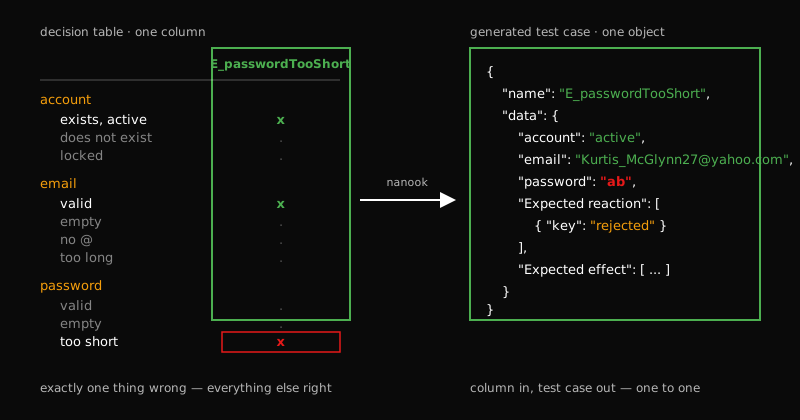
Running the table through Nanook produces one object per column. Reduced to the fields that matter, this is a single run, values unedited:
case                 account   email                              password           expected     effect
OK_login             active    Jennifer_Tremblay@hotmail.com      VuZGJBushpsbY_b    signed in    counter unchanged
E_emailEmpty         active    —                                  iu2MngWY7bxFuXF    rejected
E_emailNoAt          active    torsten.link                       0qeDxgDRG0kwRAT    rejected
E_emailTooLong       active    aaaa…aaaa (255)                    3laNNg1Jt_jjWCk    rejected
E_passwordEmpty      active    Kelli_Ankunding54@gmail.com        —                  rejected
E_passwordTooShort   active    Kurtis_McGlynn27@yahoo.com         ab                 rejected     counter rises
E_unknownUser        absent    Cody.Kuhic-Kuphal@yahoo.com        gRL7wb1Xz1m2maI    rejected     counter unchanged
E_lockedUser         locked    Johan_DuBuque@hotmail.com          8FnRb944emJsD4c    rejected
(The 255-character address is abbreviated for display; the generated value is 255 letters
a.)
A few things are only visible in the output, not in the table:
E_emailEmptyhas no email key at all. The dash is not an empty string — the field is absent from the object. An empty class means the field is not sent, which is a different test from sending"", and a form that handles one may well mishandle the other.E_emailTooLongis exactly 255 characters: one over the 254-octet limit of RFC 5321. A boundary case is only a boundary case if the number is exact; “some long string” tests nothing.- The passwords differ in every row. They are generated per run, not a fixture.
A test that hard-codes
Test1234!passes forever after someone adds a password blocklist that happens not to contain it; a generated value gets a fresh chance to collide with every rule on every run. accountvaries only in the two rows where it is the point. Everywhere else it isactive, the normal world — which is what makes the other six cases statements about the form and not about the account.
When Faker Is Not Enough
The first version of the table did not use gen::len:255. It used what looked
obvious: gen:1:faker:string.alpha:255. That does not work, and it is worth saying
exactly why.
A Faker path in a generator directive takes no arguments. The directive is split
on . and called as a path — string.alpha:255 is split into string and
alpha:255; the second is not a Faker function, and the call throws.
What happened when we ran it: Nanook logged the error and the case was not emitted. Seven test cases came out instead of eight. The run did not stop; the error sat in the log, and the other seven cases were perfectly fine. If nothing in your pipeline checks the count of generated cases against the count of table columns, a case can disappear this quietly. Check the number.
The fix is a generator of our own, ten lines:
// `gen::len:255` -> a string of exactly 255 'a'. Faker paths take no
// arguments, so an exact length needs a generator of its own.
class GeneratorLen extends DataGeneratorBase {
  async doGenerate(request: DataGeneratorGenerateRequest) {
    const cfg = request.generatorDirective?.config
    const count = Number.parseInt(String(cfg ?? '').replace(/^len:/, ''), 10)
    return Number.isFinite(count) ? 'a'.repeat(count) : undefined
  }
}
And one line to make it available under the name the table uses:
registry.registerGenerator('len', new GeneratorLen({ logger, name: 'len' }))After that, eight cases. The custom generator
tutorial covers the interface; the directives guide has
the full gen: syntax, including the instance number.
What the Table Is Worth After Day One
Eight cases for a login form is not a large number, and it is not the claim. Most teams already have a handful of login tests. The value is in two properties the eight cases have that the hand-written ones usually lack.
The specification is readable by someone who does not write TypeScript. The
table above says what the login form must do, in the vocabulary of the form. Add a class to
email — say “unicode domain” — and the case count follows on
its own; the person adding it does not need to know how the test runner is built. Compare that with
a const CASES = [...] inside a spec file, which belongs to whoever writes the spec
file.
The same table drives execution. The eight objects above are not documentation; they are the input to whatever runs the test. How that scales past one form — to a whole application, with the table as the only source — is the subject of the field report on testing a SaaS with Nanook; this post stops at the eight.
Try It on Your Own Form
Two steps. Install Nanook and the skill following the Quickstart with Claude Code, then run the slash command against your own login page. The tutorial walks through the markers if the table needs editing, and the equivalence class guide explains why the classes are chosen the way they are. The source is on GitHub.
Point it at your own login page. Run /createEquivalenceClassTable Login Form, and compare the result with the login test
cases you have today. The interesting number is not how many cases it produced — it is how
many of them you already had.
Nanook is built and supported by xhub.io. For a review of your tables, help with an integration or a support contract, see Support or write to nanook@xhub.io.