
Test Data Generation: Manual vs. Automated
Every software project needs test data. But how that data gets created — and how well it covers the things that matter — varies wildly. Some teams hand-craft JSON fixtures. Others copy sanitized slices from production. A few use systematic generation. Most do a mix of all three, with no clear strategy.
This article compares the two fundamental approaches: creating test data manually versus generating it automatically from specifications. We will look at where each shines, where each breaks down, and how to decide when it is time to make the switch.
The Test Data Problem
Test data is one of those things that seems simple until it isn’t. A login form has two fields and maybe six equivalence classes. A payment API has twenty fields, each with their own validation rules, edge cases, and dependencies. The number of meaningful combinations grows exponentially.
The consequences of getting test data wrong are real:
- Missed bugs — if your test data only covers the happy path, your tests will only catch happy-path failures
- Flaky tests — random or poorly structured data leads to intermittent failures that erode trust in the test suite
- Slow onboarding — new team members cannot understand what the tests cover or why specific values were chosen
- Compliance risks — using production data in test environments can violate GDPR and other regulations
Manual Test Data Creation
How It Works
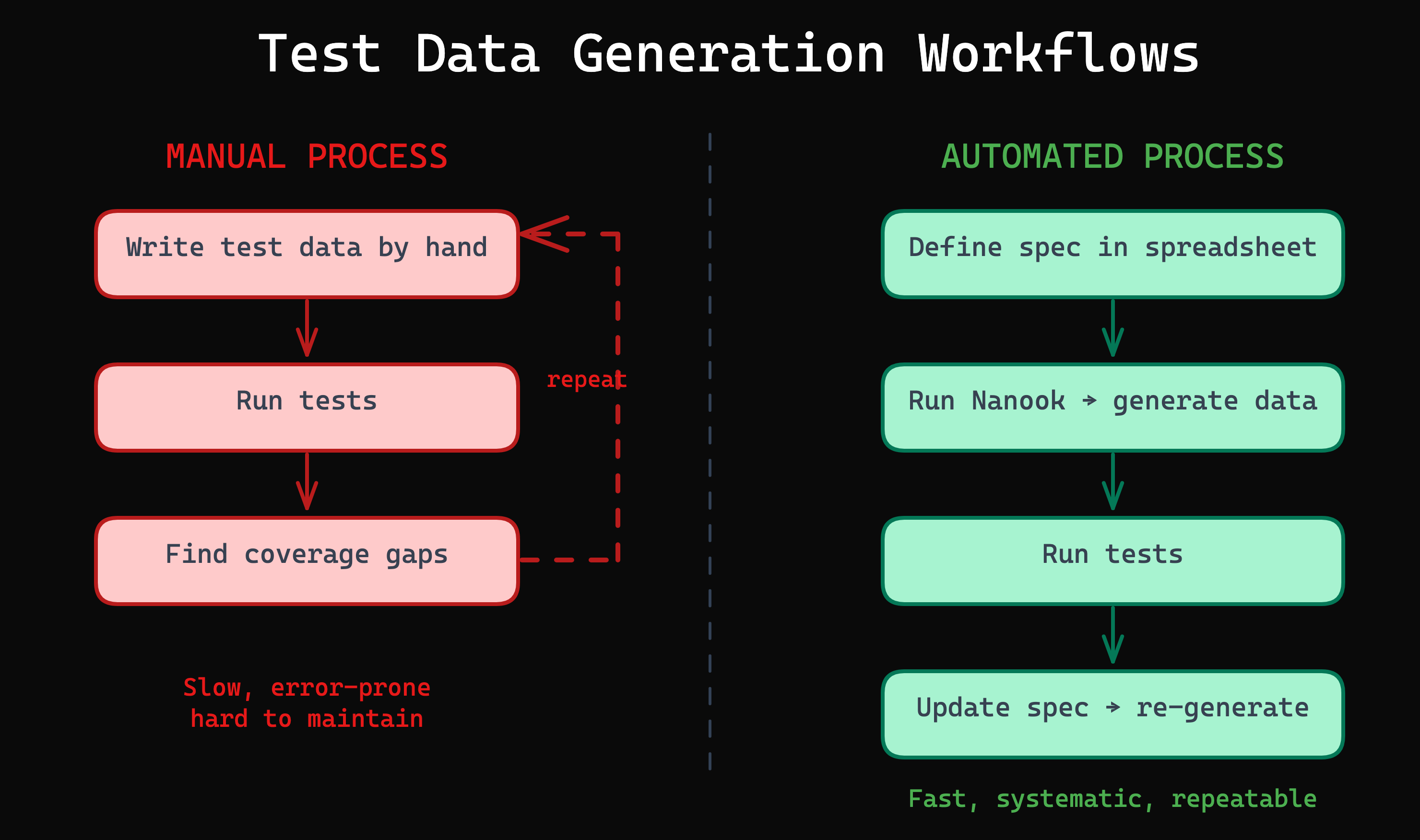
A developer or tester writes test data by hand: JSON files, SQL insert scripts, factory functions, or inline values in test code. The data is typically based on intuition, experience, and whatever edge cases the author happens to think of at the time.
A typical manual fixture might look like this:
{
  "userId": "john.doe@example.com",
  "password": "Secret123!",
  "role": "admin"
}
This tests one scenario: a valid admin login. To cover more cases, you write more fixtures. Each one is a separate file or function that someone has to create, maintain, and understand.
When Manual Works
- Prototypes and throwaway code — if the project will not live longer than a few weeks, the investment in automation is not worth it
- Fewer than 10 input combinations — when the total number of test cases is small, manual creation is fast and manageable
- Stable requirements — if the data model and validation rules rarely change, maintenance burden stays low
When Manual Breaks Down
- Scale — 3 fields with 4 classes each produce 64 combinations. 5 fields with 5 classes produce 3,125. No one writes that many fixtures by hand.
- Bias — testers tend to write tests for the scenarios they already know about. The value of systematic testing is catching the scenarios you did not think of.
- Maintenance — when requirements change, every affected fixture must be found and updated manually. In a large project, this is a full-time job.
- Traceability — there is no way to answer “which equivalence classes does our test suite cover?” without manually auditing every fixture.
Automated Test Data Generation
How It Works
Instead of writing individual data points, you define a specification of what should be tested: the input fields, their equivalence classes, and which combinations matter. A tool then generates the actual test data from that specification.
The specification can take many forms. In Nanook, it is an equivalence class table in a spreadsheet — a format that is readable by anyone on the team, not just developers.
The Advantages
- Scales to any number of combinations — define the classes once, generate as many test cases as needed
- Systematic coverage — every equivalence class is represented, not just the ones someone remembered
- Reproducible — the same specification always produces the same test data
- CI/CD integration — test data regenerates automatically when specifications change
- Auditable — the specification document is living documentation of what is tested and why
The Trade-offs
- Initial setup cost — defining specifications and configuring generators takes more upfront time than writing a few fixtures
- Requires test design knowledge — you need to understand equivalence partitioning and boundary value analysis
- Tooling dependency — mitigated by choosing open-source tools with no vendor lock-in
Head-to-Head Comparison
| Dimension | Manual | Automated |
|---|---|---|
| Setup time | Minutes | Hours (one-time) |
| Ongoing maintenance | High — every change requires manual updates | Low — update spec, regenerate |
| Coverage confidence | Low — intuition-based | High — specification-based |
| Scalability | Poor — exponential growth | Excellent — linear in spec size |
| Traceability | None | Full — spec maps to test cases |
| CI/CD integration | Manual updates each cycle | Automatic regeneration |
| Team accessibility | Developers only | Anyone who can edit a spreadsheet |
| Cost at scale | Grows linearly with project size | Flat after initial setup |
When to Switch
Stay Manual When…
- The project is a prototype or proof of concept
- There are fewer than 10 meaningful input combinations
- Test data rarely changes
- The team has no time for upfront investment right now
Automate When…
- Input fields have multiple equivalence classes each
- Test data needs to be regenerated frequently
- Multiple teams or testers contribute to test specifications
- Compliance or audit requirements demand traceability
- The project will be maintained for more than 6 months
- You find yourself copying and modifying existing fixtures instead of creating new ones from scratch
How Nanook Bridges the Gap
Nanook is designed to make the transition from manual to automated as smooth as possible. Here is why:
- Spreadsheets as the interface — your test specifications live in Excel, LibreOffice, or Google Sheets. No new tools to learn, no DSL to master.
- The spec is the generator input — the equivalence class table that documents your test design is the same file Nanook reads to produce test data. One source of truth.
- Built-in + custom generators — common data types (emails, names, dates) work out of the box. For domain-specific data, write a custom generator in JavaScript.
- Any output format — JSON, CSV, or custom formats via pluggable writers.
- Node.js-based — fits into any CI/CD pipeline. Run it with
node, no special runtime needed. - Open source (MIT) — no licensing cost, no vendor lock-in, no surprises.
Here is what the difference looks like in practice. Instead of maintaining dozens of hand-crafted fixtures:
// Before: 9 manual fixtures for a login test
fixtures/login-empty-empty.json
fixtures/login-empty-wrong.json
fixtures/login-empty-valid.json
fixtures/login-invalid-empty.json
... (9 files, each maintained by hand)
You maintain one spreadsheet and run one command:
node src/generate.jsNanook reads the equivalence class table and produces all 9 test data files automatically. When the login API changes, you update the spreadsheet — not 9 individual files.
Getting Started
If you are ready to try automated test data generation, here is a practical path:
- Pick one feature or API endpoint — start small, with something you already have manual test data for
- Create an equivalence class table for its input fields
- Run Nanook to generate test data from the table
- Compare coverage with your existing manual fixtures — you will likely find gaps
- Expand to more endpoints as you gain confidence
Ready to move beyond manual test data? Start with the Nanook Quickstart Guide — you will have automated test data generation running in under 5 minutes. Or explore the full tutorials to see equivalence class tables in action.